
Website maintenance cost by tier: what each one covers
Essential at $97 a month covers verified updates, security patching, daily backups, uptime monitoring and same-week minor edits. Growth at $297 adds real-user performance monitoring, a monthly Core Web Vitals report and priority response. AI Operations at $497 adds monitoring for AI features. Every tier cancels monthly.
The website management service has the full tier list.
| Tier | What it covers |
|---|---|
| Essential, $97 a month | Core, plugin and theme updates applied and verified by an engineer. Security patching. Daily backups, plus a backup before every update. Uptime monitoring. Next-business-day incident response, with a root-cause fix after repeated incidents. Same-week minor content edits |
| Growth, $297 a month | Everything in Essential, plus real-user performance monitoring, a monthly Core Web Vitals report and priority response |
| AI Operations, $497 a month | Everything in Growth, plus answer-quality monitoring and hallucination spot-checks, token spend reports, content re-indexing, and prompt and model updates |
Price the downtime, not the feature list
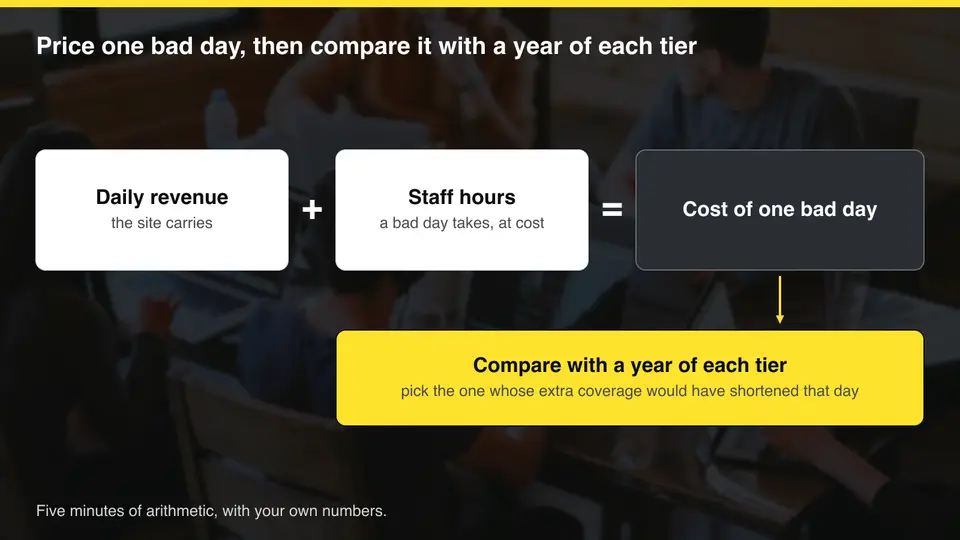
A brochure site that could be offline for a weekend without anyone noticing fits the lowest tier. A site that takes orders or bookings carries revenue, so the question is what one day offline costs in lost sales plus the staff time spent on recovery. Price that day first, and the tier follows from it.
An invented example: a shop carries $600 a day in orders, and two staff spend six hours each on recovery at $40 an hour. One bad day costs $600 plus $480, or $1,080. A year of Essential is $1,164, Growth is $3,564 and AI Operations is $5,964.
Check what the extra coverage changes. Priority response can shorten an outage, and answer-quality monitoring matters only if you run an AI assistant. See AI chatbot maintenance and monitoring for what it involves.
Write down the daily revenue the site carries
Add the staff hours a bad day would take, at what they cost
Add both for the cost of one bad day
Compare it with a year of each tier
Choose the tier whose extra coverage would have shortened that day
How fast WordPress updates now have to move
Updates now run against a clock. Patchstack's State of WordPress Security in 2026(opens in a new tab) counted 11,334 new WordPress vulnerabilities in 2025, 42% more than the year before, and 91% were in plugins. For heavily exploited vulnerabilities it reports a median time to mass exploitation of 5 hours, so a monthly update day leaves a long gap.
Patchstack sells WordPress security products, and its data covers WordPress only, so read the figures as one vendor's dataset. The direction still matters for any platform with plugins: waiting for a calendar date is a weak maintenance loop.
| Finding | Figure |
|---|---|
| New WordPress vulnerabilities | 11,334, up 42% on 2024 |
| Where they were found | 91% in plugins, 9% in themes, 6 in core |
| Not fixed by public disclosure | 46% |
| Median time to mass exploitation, heavily exploited vulnerabilities | 5 hours |
The update loop that keeps a site safe
A safe update is a loop with a way out. WordPress 6.6 added rollbacks for plugin auto-updates(opens in a new tab). After an update it makes a loopback request(opens in a new tab) to the homepage, looks for a PHP fatal error, and restores the previous plugin version if it finds one. That catches a crash. It does not test your checkout or your forms.
Our Essential tier lists updates applied and verified by an engineer, with a backup taken before every update. That covers the backup, update and verify steps of the loop below, with a person doing the verify step.
Back up the site
Apply the update
Check checkout, forms and key pages
Roll back if anything fails
Record what changed
Website retainer pricing: what a quote should cover
A quote should name who applies updates and how they confirm the site works afterward, what the security response is, how backups are taken and restores checked, what uptime monitoring covers with a stated response time, and an edit allowance. General support with no scope attached is the phrase to question.
We do not quote market price averages here. The published ranges we read came mostly from companies that sell plans, and they varied with what each price included. Compare scope across quotes before you compare price.
- Updates: who applies them, how they verify checkout and forms afterward, and what happens when an update breaks something.
- Backups: how often, and whether one is taken before each update.
- Response: what counts as an incident, and how fast someone replies.
- Edits: how many small changes are included.
- Exit: whether you can cancel monthly, and what documentation you get if you leave.
Can you maintain the site yourself?
Yes. Updates, backups and uptime checks are learnable, and many owners handle them for years. The real cost is attention. Maintenance usually fails in the busy month, when the update waits and nobody checks that the backup restores. A schedule that survives that month is what separates a working routine from a good intention.
If you do it yourself, schedule the work and keep a written list of what each check covers. If you are weighing a hire instead, see in-house vs outsourced website management.
- Pick a fixed day each week for updates.
- Write down what each check covers.
- Restore a backup to a test copy at least once a quarter.
- Send uptime alerts to a phone that someone answers.
- Keep one list of open maintenance items, each with an owner and a next action, and review it weekly.

Questions about how much to pay for website maintenance
What does website maintenance usually include?
Updates, security patching, backups, uptime monitoring and small content edits. Scope varies by provider, which is why a quote should list each item.
Does a maintenance plan include new features?
No. Minor content edits within the same week are included. New features are scoped projects, separate from the plan.
How fast do WordPress vulnerabilities get exploited?
Patchstack reports a median of 5 hours to mass exploitation for heavily exploited vulnerabilities in its 2025 data. That is the median for heavily exploited flaws, not for every vulnerability, and it is one vendor's dataset.
Can I cancel a maintenance plan?
Our plans cancel monthly with no lock-in. Ask any provider about notice periods, and what you receive if you leave.