
AI coding workflow for WordPress developers: the tool is not the problem
Once a team uses more than one AI coding tool, the tools are rarely what goes wrong. Context is. Each tool holds its own copy of the project rules, decisions and test expectations, and the copies drift apart. A workflow fixes that. Another tool does not.
Familiar failures follow. A prompt turns into unofficial documentation, a decision sits in one chat history, and a rule works in one person's tool setup and nowhere else. Every new session reloads background that should already be written down.

Shared context for coding agents: one AGENTS.md file, not five
AGENTS.md is a plain Markdown file that coding agents read for project instructions. The Agentic AI Foundation(opens in a new tab), under the Linux Foundation, stewards the format. It has no required fields, and the closest file to the edited code wins, which makes it a sensible single home for rules that every tool should follow.
Claude Code reads AGENTS.md directly(opens in a new tab) only when no CLAUDE.md exists in the working directory or above it. If you already have a CLAUDE.md, its documentation recommends starting it with an @AGENTS.md import and putting Claude-specific notes below. A symlink also works, but the same page warns that its edit and write tools refuse to write through one, so edit the real file.
Keep the file short and checkable. The same documentation targets under 200 lines per CLAUDE.md file and prefers instructions concrete enough to verify, such as use 2-space indentation, over format code properly.
| Situation | What to do |
|---|---|
| No CLAUDE.md in the project | Claude Code reads AGENTS.md directly |
| You already have a CLAUDE.md | Start it with an @AGENTS.md import, then add Claude-only notes |
| You want one literal file | Symlink CLAUDE.md to AGENTS.md, and edit AGENTS.md, not the link |
| Instructions are vague | Rewrite each one so a reviewer could check it |
How we structure it for WordPress: Fleet Mode and Site Mode
WP Fleet is our internal WordPress workspace framework, one root with shared rules and tooling for a group of sites. Work happens in one of two modes. In Fleet Mode it reads the fleet summary, and in Site Mode one site summary. Neither mode scans sibling sites or WordPress core by default.
Rules and skills load on demand from a shared agent hub instead of being pasted into every prompt. Its agent hub holds 24 rules, 30 skills, 41 workflows and 9 agent roles, and the fleet registers 8 sites. Loading only what a task needs is the aim, so the same rules stay in force on every site.
Around it sits a normal toolchain: PHP 8.4 with strict types, PHPStan at level 6, Pest tests, and contract and feature suites that must pass. Its own documents state that the agent layer is optional, and that the runtime stays useful without it.
Read the site summary and profile
Load only the rules the task needs
Triage and inspect the current state
Validate before changing anything
Act, then record the result
WordPress Abilities API: the platform's own agent layer
WordPress is adding an agent layer of its own. The Abilities API(opens in a new tab), a registry of things a site can do, is in WordPress 6.9 on the server side, and the client side is planned to join core in 7.0. An MCP Adapter exposes those abilities as tools to clients such as Claude, Claude Code, Cursor and ChatGPT.
Treat this as a direction, not a settled interface. The core team's December 2025 post(opens in a new tab) lists a command palette, a bidirectional adapter and a workflows API as plans without dates, and it does not discuss agent permissions. Before you connect an agent to a live site, check which role it acts as and what that role can change.
Our own MCP execution is deliberately deferred. WP Fleet requires operator confirmation at each step for any action beyond reading context.
The gate before any change
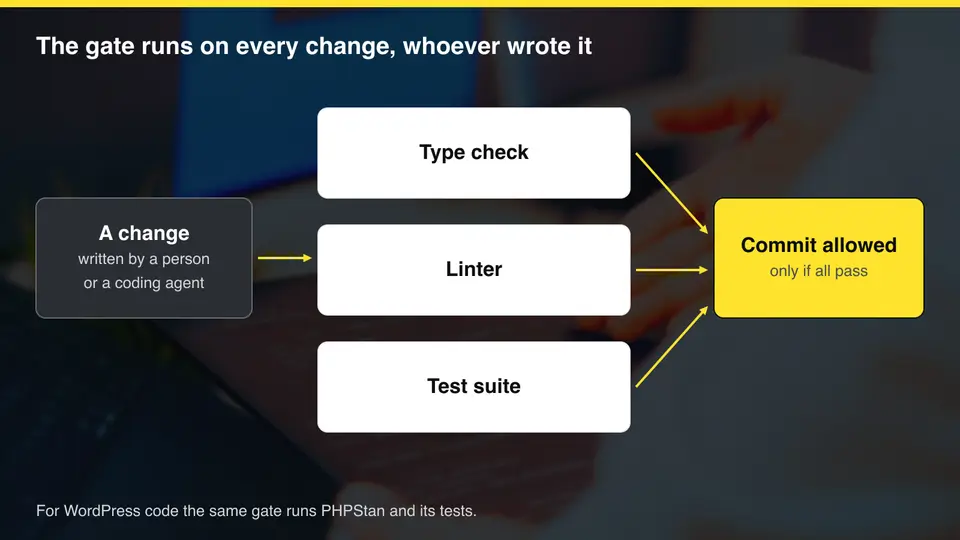
Shared context only helps if something enforces it. Before any commit in this site's repository, a pre-commit hook runs the type check, the linter and the test suite, whoever wrote it. WP Fleet does the same for WordPress code with PHPStan and its tests. The gate, not the prompt, is what stops a bad change.
This site keeps one AGENTS.md of 92 lines, with CLAUDE.md as a symlink to it, plus 40 skills and 14 gated workflows. Skills hold the long procedures, so the always-loaded file stays short. Where each check should run is covered in our CI/CD pipeline case study.
What we have not measured
We have no measured time saving, defect rate or cost figure for this setup, so this article makes none. Counts above describe structure, not results. A shared workflow is easier to review and reason about, but whether it speeds delivery is something we would need to test against a baseline before claiming it.
A checklist for your own workflow
Start with what you already have and write the rules down once. Keep this checklist short on purpose, because a long rules file is followed less reliably than a short one, and every extra line competes for the same context.
- One shared AGENTS.md for the rules every tool should follow.
- Under 200 lines, with each instruction checkable.
- Long procedures in skills or workflow files, not the main file.
- Fleet-level rules kept apart from site-level overrides.
- A gate that runs before every commit, for people and agents alike.
- Decisions written down where the next session will find them.
- Read-only by default for anything that touches a live site.
- A note of what you have and have not measured.
Questions about an AI coding workflow for WordPress developers
Which AI coding tool is best for WordPress development?
We do not rank them, because no source we trust does so for WordPress work. The tools differ in where they work, in the editor or the terminal, and most teams end up using more than one. Choose by task, then put the shared rules in one file every tool can read.
Does Claude Code read AGENTS.md?
Yes, when the project has no CLAUDE.md in the working directory or above it. If a CLAUDE.md exists, Claude Code reads that instead, so start it with an @AGENTS.md import. Check the current Claude Code documentation, since this behavior has changed over time.
What does the WordPress MCP Adapter do?
It exposes abilities registered through the WordPress Abilities API as MCP tools that compatible agents can call. It was an early version when the core team described it in December 2025, so check its current state and what permissions it applies before using it on a live site.