
Ongoing WordPress Maintenance Under a Management Retainer
Predictable monthly retainers that keep your website updated, secure, backed up, and monitored, on any platform, including custom PHP/CodeIgniter applications.
Platforms we support
We run production WordPress at the unglamorous level that keeps it fast and unhacked: verified updates with a backup first, field-data performance work, and honest advice about when WordPress is and isn't your answer.
Breezy Sites provides three WordPress services: managed maintenance from $97/month (updates, security, backups, uptime), Core Web Vitals remediation measured against 28-day field data ($795 diagnostic credited toward a $1,500–$2,500 sprint), and migrations into or out of WordPress with full 301 mapping.
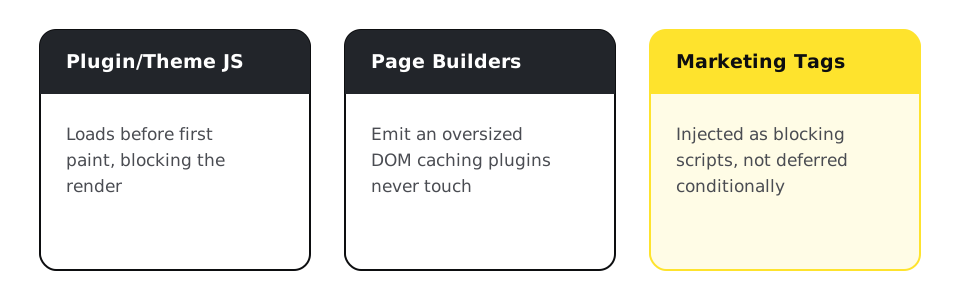
Plugin and theme JavaScript loading before first paint, page builders emitting oversized DOM, and marketing tags injected as blocking scripts. Caching plugins do not touch any of these, which is why the fix is manual: conditional script deferral, render-path correction, image priority. Full method on the Core Web Vitals page.
WordPress maintenance covers the routine work that keeps a site current, secure, and recoverable. On every plan that means core, plugin, and theme updates applied and verified by an engineer on a schedule with a backup taken first, security patched when disclosures land, daily backups with restores tested before handback, uptime watched with a stated response, and minor content edits turned around the same week. Custom themes and legacy plugin stacks are included.
Tiers start at $97/month. Growth adds real-user performance monitoring, a monthly Core Web Vitals report, and priority response, and every tier is listed on the Website Management page.

Routine work: from Squarespace or Wix, for ownership and a higher ceiling, with one-to-one 301 mapping and a staged cutover on the Migrations page. Moving the other direction, off WordPress, is its own decision covered below, since it deserves more than a one-line mention.

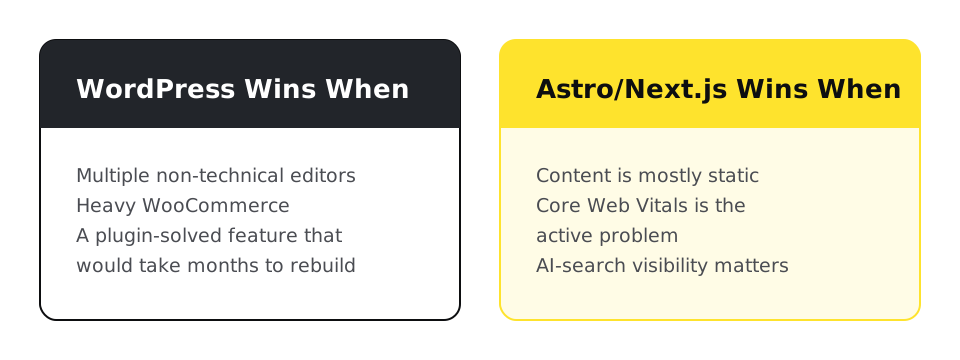
Neither wins outright. WordPress keeps its edge for multiple non-technical editors, heavy WooCommerce, or a plugin-solved feature that would take months to rebuild as custom code; Astro or Next.js pull ahead once content is mostly static and Core Web Vitals or AI-search visibility is the active problem. The full breakdown, including the real migration cost and timeline instead of a flat comparison-article number, is on the WordPress vs Astro/Next.js comparison page. The technical audit checks which side of that line your specific site actually falls on.
Keep wp-admin, replace only what renders pages to visitors. WordPress stays the CMS, a WPGraphQL layer exposes its content and custom fields (built in ACF), and Astro or Next.js renders the frontend from a small set of templates instead of a page-by-page rebuild. This is the practical answer for a content-heavy site with multiple editors, custom post types, and hundreds or thousands of existing pages, where a full migration off WordPress would cost more in effort than it returns in speed. The full architecture, including how templates and custom fields connect, is on the WordPress to Astro migration page. Book a technical audit to find out whether your site fits this pattern or a full migration.

One line we run against every managed WordPress site to see what is out of date:
bash
wp plugin list --update=available --format=countA boring command, run on a schedule, is most of what keeps a WordPress site from getting hacked.
Predictable monthly retainers that keep your website updated, secure, backed up, and monitored, on any platform, including custom PHP/CodeIgniter applications.
Manual engineering against real-user field data, not another caching plugin. Fixed-fee diagnostic and remediation sprints measured against 28-day CrUX data.
Leave your platform, keep your rankings: full 301 redirect mapping, staged cutover, and 90-day post-migration rank monitoring, plus zero-data-loss AWS server and database migrations.
What carries over, the Shopify import limits, and the redirect rules.
What leaves with you, and who does the upkeep.
Custom code, upkeep, and what a Squarespace export carries.
How WordPress compares to Wix and Webflow on ownership, ceiling, and exit cost.
The exact process for moving a Squarespace or Wix site to WordPress.
Where WordPress still wins, where Astro or Next.js wins, and the real migration cost and timeline.
Two paths off a slow WordPress site: a full migration to Astro, or headless WordPress with WPGraphQL feeding Astro or Next.js.
Going deeper
Yes, including undocumented ones the original developer abandoned. We audit, document, then maintain, the same rescue pattern we use for custom applications.
Usually. Most failures live in script loading and images, not theme structure. The diagnostic tells you which kind yours is before you spend on remediation.
Yes: maintenance, speed, and migrations including catalog and order data. E-commerce moves get the assessment-first treatment because data extraction is the real risk. Ongoing store care is described under ecommerce website management.
For content-heavy sites that want ownership: often yes. For a workflow that is really a custom application: often no. The audit answers it for your case, and we migrate both directions, so the advice has no thumb on the scale.
Core, plugin, and theme updates applied and verified by an engineer after a backup, security patching, daily backups, uptime monitoring, and minor content edits turned around the same week. Higher tiers add performance monitoring and priority response.
Market pricing varies widely with what a plan includes and whether a person reviews the work, so compare the written task list rather than the headline price. Ours starts from $97/month on published tiers, and the pricing page lists what each tier includes, line by line.
Auto-updates apply patches but do not check whether the site still works afterward, restore a backup as a test, or respond when something breaks. They suit a low-stakes site. A site that earns revenue needs someone accountable for the result.
Platforms we support
The audit finds which plugins, scripts, or theme choices are actually costing you speed and security, before you touch a single setting.