
Every Other Platform Migration We Run
The guaranteed process behind every platform pair, and the guides for each.
Website migration
Move a WooCommerce store to Shopify with products, customers, orders, and rankings intact. The risk is not Shopify; it is the data shape and the URLs, and that is where we start.
A WordPress to Shopify migration moves a WooCommerce catalog, customers, orders, and SEO equity onto Shopify while the store keeps selling. The $495 Migration Risk Assessment inventories your URLs and audits what each data type can export, then gives a fixed quote from $1,500. It fits stores that want hosting, security, and updates handled for them, and it is not the right move when the real problem is speed or a workflow.
The catalog is rarely the hard part. The limits sit on the Shopify side of each import. Linked facts come from Shopify's own documentation, checked 10 October 2026; unlinked cells are our description.
Sources, checked 10 October 2026
Rankings attach to URLs, and a WooCommerce store and a Shopify store do not share a URL structure. Every old product, category, page, and blog URL gets a hand-built 301 to its Shopify equivalent, titles and meta descriptions are carried over field by field from your SEO plugin rather than regenerated, and the redirect file is verified on staging before any DNS change. Shopify only allows redirects from URLs that currently return a 404 (Shopify Help Center: URL redirects), so the redirect file is loaded once the new store is live, which is why the cutover window and the redirect import are planned together.

A WooCommerce store is a stack of plugins, each doing a job. The migration is a replacement plan for those jobs, decided during the assessment, not after.
WooCommerce's extension ecosystem covers subscriptions, bookings, memberships, shipping carriers, and tax (WooCommerce plugin page on WordPress.org). Each one needs a Shopify equivalent, a native feature, or a decision to drop it.
Shopify Payments avoids third-party transaction fees; third-party payment providers carry them (Shopify Help Center: Third-party payment provider transaction fees). Which gateway you keep changes the cost of the move's payoff.
If WordPress also runs your blog or marketing pages, you can move everything, or move only the store and keep WordPress for content. The assessment settles which, because it changes the redirect scope.
Sometimes the store is fine and the problem is somewhere else. If the pain is speed, Core Web Vitals work on the existing WooCommerce store, from $2,500 for e-commerce, can fix it without a platform change. If the pain is upkeep, a management retainer may be cheaper than moving. If the requirement is a workflow such as tiered B2B pricing or an approval step, a small custom application beats stacking apps on either platform. The Shopify vs WooCommerce comparison sets out the trade-offs.
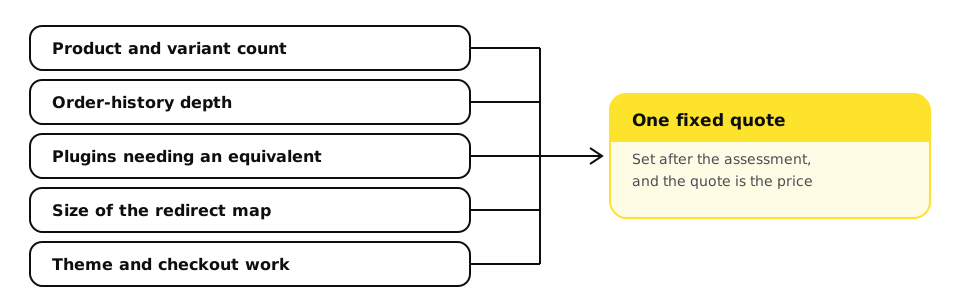
Migrations are quoted from $1,500 after the $495 assessment, which credits toward the project. What moves the number: product and variant count, order history depth, the number of plugins that need an equivalent, theme work, and the size of the redirect map. The assessment turns those variables into a fixed quote, and the quote is the price. Market ranges are in the website migration cost guide.
Every migration produces a file like this covering every URL on the old store:
csv
Redirect from,Redirect to
/product/blue-widget/,/products/blue-widget
/product-category/widgets/,/collections/widgets
/2023/05/big-news/,/blogs/news/big-news
Shopify imports redirects from a CSV like this. The old WordPress URLs on the left are placeholders; a real file has one row per URL that carried traffic.
The guaranteed process behind every platform pair, and the guides for each.
Manual engineering against real-user field data, not another caching plugin. Fixed-fee diagnostic and remediation sprints measured against 28-day CrUX data.
Updates, security, backups, and uptime monitoring on fixed-fee tiers.
What we fix, maintain, or migrate specifically on WordPress.
What we fix, maintain, or migrate specifically on Shopify.
Going deeper
Inventory every URL, build a one-to-one 301 redirect map from old product, category, page, and post URLs to their Shopify equivalents, carry titles and meta descriptions over unchanged, verify on staging, and cut over in a low-traffic window with the redirects loaded immediately.
Not if the plan covers it. Shopify's own order export covers captured payments only, so order history moves through an importer or the API and is reconciled against totals before cutover.
Each plugin is mapped to a Shopify app, a native feature, or a deliberate drop during the assessment. Subscriptions, bookings, and memberships need the most care.
Yes. Keeping WordPress for content and moving only the store is a valid scope. It changes the redirect map and how the two sites link, which the assessment settles.
Small catalogs take weeks, and large catalogs with order history and many plugins take longer, driven by data volume and how many plugin jobs need replacing. The assessment gives a real timeline.
It is when you want hosting, security, and updates handled by the platform and the store is the business. It is not when the real problem is speed or a custom workflow, which cheaper fixes can solve.
Website migration
The assessment inventories your URLs, audits your data, and tells you whether Shopify is actually the fix before you commit to the move.